Cluster Watercolor Botanical Patterns: What to Know Before You Use Them in Your Designs
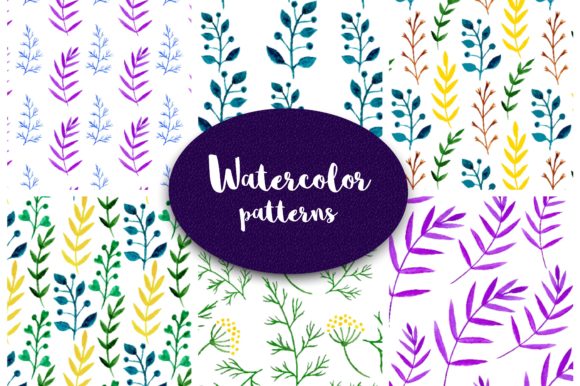
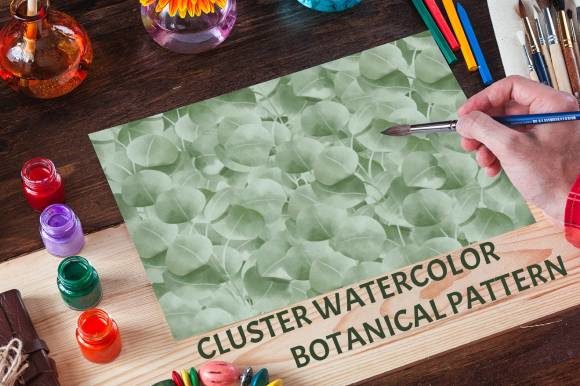
Watercolor botanical patterns have become a staple in modern design, offering a natural, organic feel that resonates across industries. Among the many options available, Cluster Watercolor Botanical Patterns stand out for their lush, blue-green leafy compositions and generous 5000×5000 pixel canvas size. Designed for graphic designers, bloggers, small business owners, and creatives of all levels, this set includes ten distinct patterns that can elevate everything from invitations and web backgrounds to branding and stationery.
However, before you download and start using these patterns, there are several important details that often catch people off guard. Understanding these nuances will help you avoid frustration, save time, and produce professional results that truly shine.
Understanding What You Are Actually Getting
One of the most common misunderstandings with digital pattern packs like Cluster Watercolor Botanical Patterns is assuming they work the same as tiling backgrounds or seamless textures. The product description clearly states these patterns are non-seamless and cannot be tiled. This is a crucial distinction that many buyers overlook until they try to repeat a pattern across a large surface and notice awkward edges or repeating lines.
The practical impact: If you plan to use these patterns for large-scale backgrounds or wallpapers where repetition is necessary, a non-seamless design will not look natural when tiled. Instead, you will need to use each pattern as a standalone element or integrate it into a larger composition without repeating it directly. The 5000×5000 pixel resolution gives you enough area to cover most standard web backgrounds or print pieces in a single use, but you cannot rely on seamless tiling for wide surfaces.
What to Check Before You Purchase
- Seamless vs. non-seamless: If your project requires a repeating background, look for patterns explicitly labeled as seamless or tileable. Cluster Watercolor Botanical Patterns are designed for single-use applications like posters, book covers, or feature graphics.
- File format: These patterns come as JPEG files. Unlike PNG, JPEG does not support transparency. This matters if you plan to layer patterns over other images or colored backgrounds. You will need to work with the white or off-white background inherent in the JPEG format or use masking techniques in your design software to remove the background.
- Resolution versatility: 5000×5000 pixels is generous for print (around 16.7 inches at 300 DPI) and more than sufficient for web use. However, file size can be large, so consider resizing for web applications to improve loading times.
Common Mistake: Ignoring the Blue-Green Color Palette
The Cluster Watercolor Botanical Patterns feature a distinctive blue-green leafy palette. This is beautiful and cohesive, but it also imposes a color guardrail that some designers ignore until it clashes with their existing brand or project colors. Blue-green is calming, natural, and versatile, but it does not suit every theme or season.
The better approach: Before you commit to this set, evaluate whether blue-green aligns with your project’s mood and color story. If you are designing for a brand that uses warm oranges or reds, the blue-green clusters may feel dissonant unless intentionally balanced. On the other hand, if you are creating content around wellness, nature, sustainability, or coastal themes, this palette will work wonderfully. You can also desaturate or recolor the patterns in software like Photoshop or Canva, but that takes time and may reduce the watercolor effect quality.
How to Test Compatibility
- Place one pattern sample against your existing brand colors or project mock-up before making a final purchase decision.
- Check whether the pattern’s contrast level works for text overlays. Botanical patterns with high detail can make text hard to read unless you add a semi-transparent overlay or place text in solid color blocks.
- Consider whether the blue-green tone leans warm or cool. This set tends toward cooler greens with a hint of blue, which pairs well with neutral whites, grays, and warm wood tones.
Mistake: Overlooking the Non-Included Mock-Ups
Preview images often show patterns applied to notebooks, phone cases, or wrapping paper. It is easy to assume those mock-ups are part of the download. The product description explicitly states that images and mock-ups used in previews are not included. This pack includes only the ten watercolor patterns themselves.
Why this matters: If you are a small business owner or entrepreneur who relies on ready-made mock-ups for client presentations or social media, you will need to create your own or purchase mock-up templates separately. The patterns are raw assets, not final layouts. This is not a flaw, but it is an expectation that, if missed, can delay your workflow. Knowing this upfront allows you to plan your full design pipeline, including sourcing mock-up files or learning how to create them in your design tool of choice.
Practical Advice for Using Cluster Watercolor Botanical Patterns Effectively
Once you understand these details, you can use the patterns with confidence. Here are several actionable strategies that will help you get the most out of this set.
Use Patterns as Accent Elements, Not Always as Backgrounds
Because the patterns are non-seamless and come in high resolution, consider using them as hero images, section dividers, or accent panels rather than full-page backgrounds. For example, you can place one pattern on half of an invitation design and leave the other half solid white or with minimal text. This highlights the beautiful watercolor texture without overwhelming the layout.
Layer Strategically in Your Software
Since the files are JPEG, you will need to use layer masks or blend modes to remove the background if you want transparency. In Photoshop, use the Magic Wand tool or Color Range selection to isolate the green leafy clusters. In Canva, use the background remover tool. For best results, work with a high-contrast version of the pattern to make selection easier. This extra step is well worth it if you want to overlay the patterns on textured papers or colored backgrounds.
Resize Thoughtfully for Different Mediums
A 5000×5000 pixel file is excellent for print but can be overkill for digital use. When designing for web or social media, resize the pattern to 1200×1200 pixels or smaller to keep file sizes manageable and page load times fast. Always keep a copy of the original high-resolution file for print projects.
Evaluating Quality and Return on Investment
When considering any digital pattern set, including Cluster Watercolor Botanical Patterns, assess quality based on several factors beyond just aesthetics. Look at the edge detail, color consistency, and whether the watercolor effect feels hand-painted or overly digital. The ten patterns in this set offer variety in the density of leaves and arrangement, which gives you flexibility for different uses.
What to watch for in watercolor patterns generally:
- Check if the colors appear muddy or overly saturated in the preview. High-quality watercolor patterns retain subtle gradients and soft edges.
- Verify that the file resolution matches your intended output. 5000×5000 pixels is robust for both print and digital, so this set scores well on that front.
- Consider the number of patterns relative to your need. Ten unique patterns give you enough variety for a cohesive brand suite or event series without being overwhelming.
Applying These Patterns Across Different Project Types
Different audiences will use Cluster Watercolor Botanical Patterns in different ways, and each use case requires a slightly different approach.
For Bloggers and Social Media Managers
Use the patterns as Pinterest pin backgrounds, blog post featured images, or Instagram story backdrops. Because the patterns are non-seamless, they work perfectly as single-image graphics. Resize to 1000×1500 pixels for Pinterest or 1080×1080 pixels for Instagram. Add a subtle overlay or text box to maintain readability. The blue-green palette will appeal to audiences interested in wellness, lifestyle, and nature content.
For Small Business Owners and Entrepreneurs
Incorporate the patterns into product packaging, thank you cards, or brand stationery. Because the patterns are not tileable, use them as accent borders, envelope liners, or small label backgrounds. If your brand already has a natural or botanical identity, these patterns can unify your visual materials without needing a custom illustration. Just remember the JPEG format limitation and plan for background removal if needed.
For Graphic Designers and Freelancers
You can charge a premium for client work that features unique, hand-painted-style elements. Use these patterns as part of larger compositions, such as event branding, wedding suites, or editorial layouts. Since the patterns come in a cohesive set, you can mix and match them across different pieces of a project for a consistent look. Be transparent with clients about the source of the patterns if they ask about exclusivity, as these are a commercial product available to others.
What to Do Before Downloading
If you are ready to move forward, here is a quick checklist to ensure a smooth experience.
- Read the product description thoroughly. Note the non-seamless nature, JPEG format, and lack of mock-ups.
- Check the license terms. Make sure the usage rights match your intended commercial or personal projects.
- Preview all ten patterns. Verify that the blue-green palette and leafy motifs fit your project’s aesthetic.
- Prepare your design software. Have a plan for removing JPEG backgrounds if you need transparency.
- Download and organize. Keep the original files in a dedicated folder and create resized copies for different uses.
By taking these steps, you avoid the most common pitfalls that lead to wasted time, mismatched aesthetics, or technical frustration.
Final Perspective on Cluster Watercolor Botanical Patterns
Cluster Watercolor Botanical Patterns offer a solid collection of eye-catching, high-resolution watercolor designs for creatives who appreciate organic, nature-inspired visuals. The ten patterns provide enough variety for cohesive branding, invitation sets, and web graphics while maintaining a consistent color story that simplifies design decisions. The limitations such as non-seamless format and JPEG files are not drawbacks if you understand them upfront and plan your workflow accordingly.
The key is to treat these patterns as design assets with specific strengths. Use them where single-use, high-impact visuals matter most, and pair them with complementary elements like neutral backgrounds, clean typography, and intentional white space. When you align the patterns with your project’s actual needs, you get results that look polished, professional, and true to the hand-painted watercolor aesthetic that makes them appealing in the first place.
Whether you are a seasoned designer or just starting out, taking a moment to evaluate the practical details before you download will save you time and help you create work you are proud to share. Enjoy the process, experiment with the patterns, and let the natural beauty of these leafy clusters bring warmth and sophistication to your next creative project.