Grapefruits Seamless Patterns: A Practical Asset for Creative Workflows
Pattern design is one of those quiet workhorses in visual projects. Whether you are building a mockup for a client presentation, designing a surface pattern for apparel, or layering texture into a digital background, the quality and consistency of your patterns directly affect the final output. Grapefruits Seamless Patterns offers a targeted solution for anyone who needs reliable, high-resolution repeating patterns without the time cost of building them from scratch. This kit is built around real project needs, not just decorative appeal, and it fits naturally into existing creative and production workflows.
What the Kit Includes and Why It Matters for Your Process
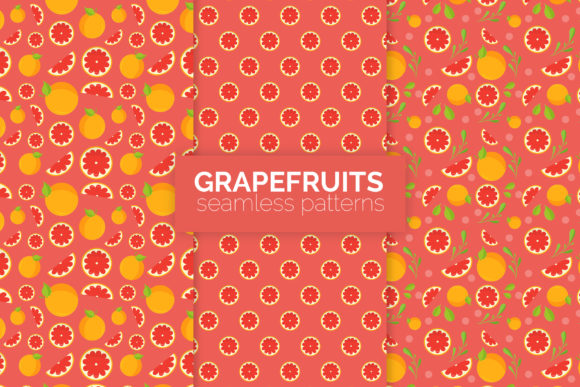
The Grapefruits Seamless Patterns kit contains three distinct seamless patterns, each delivered at 5000 by 5000 pixels. That resolution is not an arbitrary number. At 5000 px, you have enough detail to print large format applications, fill a full-screen web background without pixelation, or crop into sections while maintaining sharpness. The zip file includes three AI files, three EPS files, and three PNG files with transparent backgrounds. You also get a swatch file and three template files to help you integrate the patterns quickly into ongoing work.
For anyone who has ever spent hours trying to tile a pattern manually or fix visible seams in a repeating texture, this setup eliminates that friction. The files are ready to use, and the formats cover the major vector and raster workflows. AI and EPS give you editable vector paths. PNG with transparency gives you immediate placement in raster-based projects. The template files help with sizing, alignment, and layout testing before you commit to a final design.
Where Grapefruits Seamless Patterns Sit in a Broader Workflow
Creative work rarely happens in a straight line. You research, sketch, iterate, test, and refine. Grapefruits Seamless Patterns fits into multiple points along that curve.
Before the Project Starts: Planning and Asset Collection
When you begin a new project, gathering consistent visual assets saves time later. Instead of hunting for patterns across multiple sources or trying to generate them from scratch, you can add this kit to your library and know exactly what you have. The swatch file is especially useful during the planning phase. Import it into your design software early, test color variations, and see how the patterns behave at different scales. Knowing your pattern options before you start designing layouts, apparel graphics, or packaging helps you make informed decisions about composition and contrast from the beginning.
During Production: Direct Integration into Design Files
Once you are in the middle of a project, the less friction the better. The AI and EPS files open directly in Adobe Illustrator, Affinity Designer, CorelDRAW, and similar vector editors. You can apply the patterns to shapes, use them as fills, or composite them with other elements. The transparent PNG files work just as smoothly in Photoshop, Canva, Procreate, or web-based mockup generators. If you are building a clothing mockup, you can place the pattern onto a garment layer and see the repeat immediately. If you are designing a website hero section, the pattern becomes a background layer that needs no additional tiling work.
The template files included in the kit are particularly helpful during this phase. They give you pre-sized canvases or guides for common output sizes. That means you spend less time adjusting margins and more time refining the visual hierarchy of your project.
After Launch: Production and Consistency Across Deliverables
After a project goes live, consistency matters for branding and recognition. If you used a Grapefruits pattern in a product line, you can repurpose the same pattern for hangtags, packaging inserts, social media graphics, and retail displays. Because the pattern files are vector-based in AI and EPS formats, scaling them up or down does not degrade quality. You can output a business card and a billboard advertisement from the same source file with no loss of fidelity. This long-term usability makes the kit a practical investment, not a one-use asset.
For Apparel and Surface Design
If you are working on clothing, accessories, or home textiles, seamless patterns are the foundation of your print. The 5000x5000 px resolution gives you room to print at a variety of scales without visible pixelation. When using the vector files, adjust the pattern scale within your software to match the garment proportions. For example, a large repeat works well on a maxi dress or a duvet cover, while a smaller repeat suits a button-down shirt or a throw pillow. The transparent PNG files let you overlay the pattern onto a photograph of a garment for client mockups without needing to rebuild the pattern from scratch.
For Digital Products and Mockups
Mockup creation is one of the most common uses for this type of asset. If you sell digital products, offer design services, or run an online store, you need preview images that look polished. Grapefruits Seamless Patterns give you a ready-made backdrop or product surface that does not distract from the item you are showcasing. Use the PNG files with transparent backgrounds to layer patterns onto device screens, stationery items, or packaging shapes. The template files help you align the pattern correctly within common mockup dimensions, which saves time when you are producing multiple previews for a product launch.
For Branding and Marketing Materials
Patterns can define a brand's visual identity when used consistently. If you are building a brand kit for yourself or a client, these patterns can serve as accent textures on business cards, website backgrounds, email headers, and social media templates. The vector files allow you to recolor the pattern to match brand colors without losing quality. The swatch file makes it easy to apply the pattern across Adobe software, so every piece of collateral maintains the same texture and feel. This consistency builds brand recognition and saves time when producing multi-format campaigns.
Compatibility and Tool Integration
One of the practical advantages of this kit is its format coverage. AI files work with Adobe Illustrator CS6 and later. EPS files are broadly compatible with vector editing software on both Windows and macOS. PNG files with transparent backgrounds work in any software that supports image layers. This means you are not locked into a single ecosystem. Whether you use Adobe Creative Cloud, Affinity, Corel, Sketch, Figma, Canva, or even open-source tools like Inkscape and GIMP, you can use the patterns directly.
The swatch file included in the kit deserves special mention. Swatch files in Adobe software let you load the pattern into your Swatches panel permanently. Instead of opening a second file each time, you import the swatch once and access the pattern from any document. This streamlines your workflow if you use the pattern frequently across multiple projects.
Preparation and Organization for Long-Term Use
To get the most out of Grapefruits Seamless Patterns, spend a few minutes organizing the files before you start a project. Create a dedicated folder in your design asset library for seamless patterns. Place the AI, EPS, PNG, and swatch files in clearly labeled subfolders. If you use Adobe Bridge or a digital asset management tool, tag the files with keywords such as grapefruit, citrus, seamless, pattern, and the specific color palette. This preparation pays off when you are searching for a pattern later.
Because the patterns are handmade and high resolution, they hold up well under scrutiny. When you zoom in, the linework and texture remain consistent. If you are presenting a mockup to a client or printing a large format application, that level of detail matters. It also means you can crop and recompose the pattern if needed, extracting a portion for a specific layout element without losing the seamless quality when you reapply it.
Quality Control and Consistency
Seamless patterns require precise alignment at the edges. The handmade nature of these patterns means the repeat has been tested visually and structurally. When you apply the pattern as a fill or place it as a PNG, you should not see hard lines or mismatched motifs at the tile boundary. That reliability is what makes this kit a workflow asset rather than just a decorative download. You do not need to spend time correcting seams or rebuilding the repeat.
If you plan to use the pattern across multiple deliverables, test it at different scales early. A pattern that looks balanced at 100% might feel too dense at 50% or too sparse at 200%. Because the vector files are resolution independent, you can scale freely and re-export as needed. The template files provide a starting point, but your specific project dimensions may vary. Testing scale in your target medium before finalizing production saves rework.
How This Kit Fits into a Broader Creative Ecosystem
No single asset does everything, but a well-made pattern kit touches many parts of a creative workflow. If you are a freelancer juggling multiple client projects, having a set of tested patterns in your library means you can respond faster to briefs that require texture or surface design. If you run a small business, you can use the patterns to create cohesive packaging, social media templates, and signage without hiring a pattern designer for each piece. If you teach design or create educational content, the AI and EPS files can be opened in demo lessons to show students how seamless patterns are structured and applied.
The kit also works well alongside other asset types. Combine the patterns with typography for a branded look. Use them as underlays for data visualization or infographics to add visual interest without competing with the data. Layer them with photographs in compositing workflows to create rich, textured backgrounds that feel more intentional than a flat color or a generic texture pack.
Practical Workflow Example: Launching a Small Product Line
Imagine you are launching a small line of tote bags and pouches. You want each item to have a distinctive surface pattern but you do not have time to design three custom repeats from scratch. With Grapefruits Seamless Patterns, you open the AI files, adjust the colors to match your brand palette, and scale the pattern to fit the product dimensions. You export transparent PNG mockups and place them onto product templates. The consistency across the three patterns gives your line a cohesive visual identity while each product remains distinct. You use the same patterns on your website background, social media announcement graphics, and packaging inserts. The entire process, from opening the files to launching the store page, moves faster because the patterns are ready and tested.
Final Observations on Using Grapefruits Seamless Patterns
Assets like this kit work best when you treat them as part of a broader system: planning, production, quality check, and reuse. The high resolution, multiple file formats, and included template and swatch files reduce the friction of getting from idea to finished output. Whether you are a seasoned designer building client presentations, a small business owner creating product mockups, or a hobbyist exploring pattern work, the practical value comes from how easily these files integrate into your existing tools and routines. The patterns themselves are visual, but the real benefit is the time you save and the consistency you gain across your projects.